Generate GS1128 Barcodes
Implement seamlessly across Crystal Reports, MS Excel, and MS Access



Generate GS1128 Barcode in MS Excel Spreadsheet
To generate GS1128 barcode in Excel spreadsheet: enable VBA macro in Trust Macro Settings. Press F11 to launch Visual Basic Window. Establish Library Reference referencing cruflbcs.dll library, importing barcodesoft.bas, applying the =gs1128(A1) formula, and formatting cell typography with the code128m barcode font.
Step 1. Initialize Trust Macro Settings
For Excel 2007 / 2010 / 2013 / 2016 / 2019 / 365: Click Office Menu File options → Trust Center → Trust Center Settings → Macro Settings, select "Enable all macros".
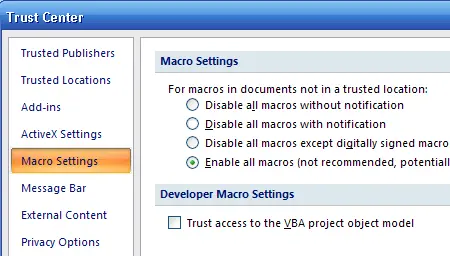
Legacy Office (2000/2003): Navigate via Tools → Macro → Security, configure to Low.
Step 2. Launch Visual Basic Window
Press ALT + F11 continuously to call up the integrated VBA Editor dashboard pane.
Step 3. Establish Library Reference Connections
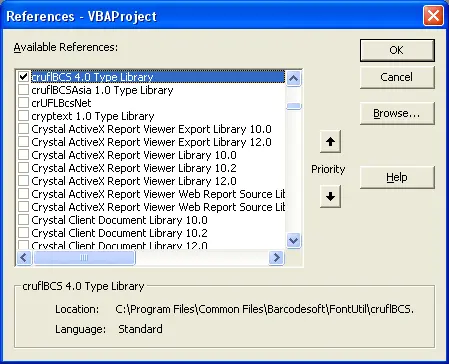
Within the editor, click Tools → References. In the browse lookup prompt path window, point directory target path location directly towards cruflbcs.dll module file assets (typically positioned inside C:\Program Files (x86)\Common Files\Barcodesoft\Fontutil directory folders). Ensure checkmark selection for crUFLBcs 1.0 Type Library is confirmed.
Step 4. Import Module Automation Macros
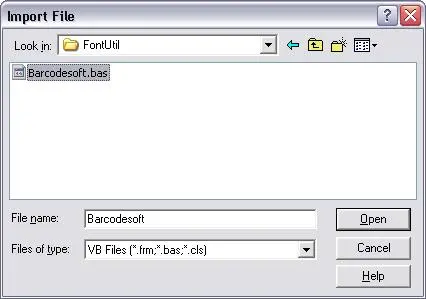
Press Ctrl + M to open the file import window context panel. Choose barcodesoft.bas file layout components from the utilities pathway mentioned above. If missing, retrieve package sources over archive zip links at cruflbcs.zip.
Step 5. Implement Column Formula Configurations
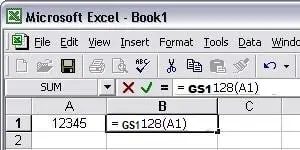
Close the Visual Basic layout editor to return focus back to spreadsheets workspace grid panels. Execute processing expressions inside desired workbook rows via standard cells referencing syntax parameters:
Note: Enclose identifiers safely inside parenthesis boundaries matching standard string rules closely.
Step 6. Set Barcode Font Style Properties
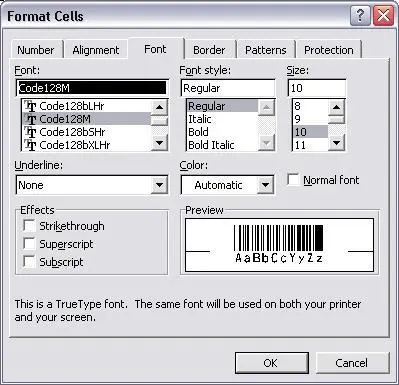
Right-click the targeting output reference cell field (e.g. B1), choosing "Format Cells" properties. Under Font settings tabs layout mapping options select typeface identifier name tags tracking code128mHr. Ensure the font style is set to Regular with Underline set to None.