
Introducing crUFLBcsNet.dll – A Modern Barcode and QR Solution
Keywords: crUFLBcsNet.dll, CQRCode, CLinear, CDatamatrix, CPDF417, CAztec, Awesome QR
The new crUFLBcsNet.dll is designed to simplify barcode and QR code integration for business applications.
It brings together the reliability of classic barcode fonts with the flexibility of dynamic image generation, making it an
ideal drop-in replacement for legacy UFL barcode solutions.
This is the pricing list of Barcodesoft crUFLBCsNet.dll package
| License | Single User | Site | Corporate | Developer | Unlimited Developer |
|---|---|---|---|---|---|
| Price | USD399 | USD799 | USD1199 | USD1999 | USD3999 |
Key Features
Pure Managed Code
Built entirely in .NET Framework 4.8, no COM or unmanaged wrappers required. Ensures stability, security, and easy integration with modern .NET applications.
Barcode Fonts + Image Generation
Continue using familiar barcode fonts, or leverage dynamic image generation when font installation is not desired. Both modes are supported side by side.
Broad Symbology Support
Exposes clean and consistent classes for multiple barcode types:
CQRCodeCAztecCDatamatrixCPDF417
Each class provides:
Encode(string)→ returns encoded text or codewords-
EncodeCR(string, index)→ Returns encoded text in chunks of up to 250 characters to accommodate the Crystal Reports formula field length limitation.
When index = 1, the method returns the first 250 characters.
When index = 2, it returns the next 250 characters, and so on until the entire encoded string is covered.
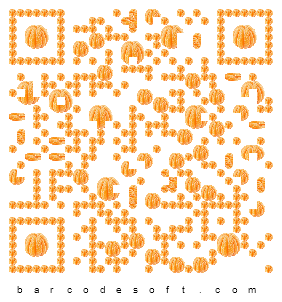
Image(string, width, height)→ returns a barcode image asbyte[]AwesomeQR(string, "pattern", "size")→ returns an artistic QR image asbyte[]- Available patterns: Coin, Cake, Cookie, Pizza, Burger, Apple, Blueberry, Broccoli, Chocolate, Donut, Lettuce, Muffin, Orange, Pear, Plum, Raspberry, Sandwich, Strawberry, Tangerine, Tomato.
- Available sizes: XXL, XL, L, M, S, XS, XXS
CLinear
Code39(string)→ returns Code39 encoded textCode39Image(string, width, height)→ returns a barcode image asbyte[]Code39Ext(string)→ returns Code39 Extended encoded textCode39ExtImage(string, width, height)→ returns a barcode image asbyte[]Code128A(string)→ returns Code128A encoded textCode128AImage(string, width, height)→ returns a barcode image asbyte[]GS1128(string)→ returns Code128A encoded textGS1128AImage(string, width, height)→ returns a barcode image asbyte[]Upca(string)→ returns UPC-A encoded textUpcaImage(string, width, height)→ returns a barcode image asbyte[]Ean13(string)→ returns EAN13 encoded textEan13Image(string, width, height)→ returns a barcode image asbyte[]
Artistic Awesome QR and DataMatrix
Generate visually rich, branded barcodes with patterns and styling.
Perfect for marketing, packaging, or anywhere aesthetics matter alongside machine readability.
Cross-Platform Rendering via SkiaSharp
Uses SkiaSharp for high-quality vector-based rendering. Output is sharp, scalable, and ready for Crystal Reports, Microsoft Dynamics NAV, or standalone .NET applications.
Using crUFLBcsNet.dll in MS Dynamics NAV
To use crUFLBcsNet.dll in Microsoft Dynamics NAV:
-
Copy
crUFLBcsNet.dllandSkiaSharp.dllinto the NAV add-ins folder (recommended:C:\Program Files (x86)\Microsoft Dynamics NAV\...\RoleTailored Client\Add-ins\). -
Ensure the native SkiaSharp binary (
libSkiaSharp.dll) for your architecture (x86/x64) is also in the same add-ins folder. (Do not place SkiaSharp into the GAC; NAV add-ins folder is preferred.) -
In the NAV development environment (C/SIDE):
- Open Tools → Object Designer → C/AL Globals.
- Create a new DotNet variable and point it to
crUFLBcsNet.dll. - Set Subtype to the class you want (e.g.,
CQRCode).
-
Example usage in C/AL code:
                                myQR := myQR.CQRCode;

                                codewords := myQR.Encode('1234567890');
                                // This requires a matching barcode font

                                barcodeBytes := myQR.Image('1234567890', 240, 240);
                                // Pure image, no font required

                                barcodeBytes := myQR.AwesomeQR('1234567890', 'Tangerine', 'XS');
                                // Artistic QR image, no font required

                                // Save to file or stream into a BLOB
                                BLOBField.CREATEINSTREAM(inStream);
                                inStream.Write(barcodeBytes);
myLinear := myLinear.CQRCode; codewords := myLinear.GS1128('(17)190508(90)50921'); // This requires a matching barcode font. Don't forget the parentheses and AI prefixes. barcodeBytes := myLinear.GS1128Image('(17)190508(90)50921', 480, 240); // Pure image, no font required // Save to file or stream into a BLOB BLOBField.CREATEINSTREAM(inStream); inStream.Write(barcodeBytes);
Using crUFLBcsNet.dll in Crystal Reports 2025
To use crUFLBcsNet.dll in Crystal Reports 2025:
-
Copy
crUFLBcsNet.dllandSkiaSharp.dllinto the Crystal Reports bin folder (for example:C:\Program Files (x86)\SAP BusinessObjects\Crystal Reports 2025\bin). -
Ensure the native SkiaSharp binary (
libSkiaSharp.dll) for your architecture (x86/x64) is in the same folder. KeepingcrUFLBcsNet.dll,SkiaSharp.dll, andlibSkiaSharp.dlltogether avoids runtime errors. -
In Crystal Reports, create a new Formula Field and call methods from
crUFLBcsNet.dllvia UFL (User Function Library):Dim qrObj As Object Set qrObj = CreateObject("cruflbcsnet.CQRCode") Dim imgBytes As Variant imgBytes = qrObj.Image("987654321", 200, 200, 1, 0, False) ' Save to a file (Crystal can reference this image path) Dim fso, file Set fso = CreateObject("Scripting.FileSystemObject") Set file = fso.CreateTextFile("C:\temp\qr.png", True) file.Write imgBytes file.Close -
If using
EncodeCR, remember Crystal Reports formula fields are limited to 250 characters. Use multiple formula fields (index = 1, 2, 3...) to reconstruct long encoded values. -
To display images: insert an OLE Object / Picture in your report and bind it to the byte[] output of
Image()orAwesomeQR().
Benefits
- No special fonts required when using image mode.
- Full backward compatibility when barcode fonts are preferred.
- Simplified integration for developers and report designers.
- Future-ready with artistic barcode generation features.
crUFLBcsNet.dll bridges the gap between traditional font-based barcoding and modern, visually enhanced code generation. Whether you need compliance-ready DataMatrix symbols or eye-catching QR codes for branding, crUFLBcsNet.dll offers a powerful and flexible solution.