Barcodesoft Inc.
12/12/2025
Our team of seasoned IT professionals, based in Toronto, Ontario, specializes in delivering advanced automatic identification solutions.
We provide state-of-the-art tools for generating barcodes tailored to your needs.
We invite you to explore our website and discover how our expertise can streamline your operations.
-

Wafer Marking Studio
Wafer Marking Studio enables users to inscribe SEMI font, SEMI T7 symbols, and BC412 symbols on the reverse side of silicon wafers using laser scribers.
Wafer Marking Studio
-

Code39 Barcode Fonts
Code39, also known as 3 of 9 code, USD-3 and LOGMARS, is a widely used bar code symbology defined in ISO/IEC 16388:2007 standard.
Code39
-

Code128 Barcode Fonts
Code 128, described in ISO/IEC 15417, is good at encoding alpha-numeric data and numeric-only data. Code128 has three subsets: code128A, code128B and code128C.
Code128 -

UPC-A EAN13 Barcode Fonts
UPC-A barcode ( plus UPC-E, EAN-13, EAN-8, ISBN and Bookland), is everywhere today. EAN13 barcode encodes 12 digits of numeric data and a check digit. What EAN13 encodes is also called GTIN13. UPCA barcode encodes 11 digits of numeric data plus a check digit.
UPC-A -

MICR E-13B Font
MICR is an acronym for Magnetic Ink Character Recognition, familiar to us from its use in banking industry. The American Bankers Association began using MICR E-13B font and MICR system as the technology for automatic check processing since 1958.
MICR E-13B Font -

QRCode Encoder
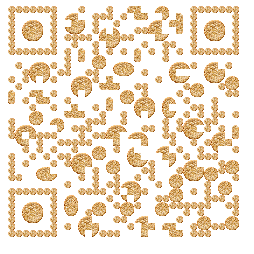
QR Code is also known as Quick Response Code. QR Code is a 2D matrix barcode symbology. QRCode Matrix size ranges between 21 X 21 modules and 177 x 177 modules. Each module is either black or white.
QRCode -

PDF417 Barcode
PDF 417, a multi-row 2-D barcode symbology, has a unique physical structure and large data capacity.
PDF417
PDF417 empowers you to encode more than 1000 alpha-numeric characters within one symbol. PDF417 is able to encode ASCII and Extended ASCII characters.
-

Data Matrix Barcode
Data Matrix barcode is a well-designed symbology that is able to encode both 128 ASCII characters (ANSI X3.4) and values 128 to 255 characters, known as extended ASCII (ISO 8859-1).
Data Matrix
Data Matrix barcode is able to encode up to 1000 alpha-numeric characters. Therefore, Data Matrix is a good solution for encoding large quantities of data in one data matrix barcode symbol.
-

Aztec Code
Aztec Bar Code is defined by ISO/IEC 24778:2008 standard.
Aztec Code
Its unique centered finder pattern and module placement algorithm makes Aztec bar code looks like a maelstrom. Aztec barcode Matrix size ranges between 15 X 15 modules and 151 x 151 modules. Each module is either black or white.
-

MaxiCode
MaxiCode is a matrix symbology consists of hexagonal modules surrounding 3 concentric rings. A MaxiCode barcode consists of a primary message and a secondary message. Each message has its own data and error correction codewords. After encoding, primary message and secondary message are interleaved together. Every binary code can find its location in the maxicode barcode symbol precisely.
MaxiCode
-

SEMI OCR Font
Barcodesoft SEMI OCR font package provides a simple solution for laser-marking alphanumeric data on the front surface of wafers and allows automatic Optical Character Reading (OCR).
SEMI OCR Font
-
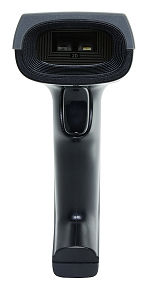
Rational Quantum X-18130 barcode scanner
Rational Quantum X-18130 barcode scanner reads linear and 2D bar codes on smart phone and computer monitor.
Rational Quantum X-18130 barcode scanner
-
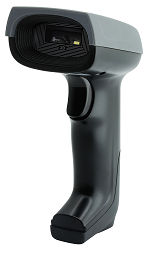
Rational Quantum X-18134 barcode scanner
Rational Quantum X-18134 barcode scanner reads linear and 2D bar codes printed on invoices, shipping labels and packing list.
Rational Quantum X-18134 barcode scanner
-
KSA E-Invoice QRCode
Barcodesoft KSA QR Code Generator automatically support tag, length and value (TLV) format and base64 encoding. QR Codes are compliant with KSA Zakat and Tax Authority of Saudi Arabia Kingdom.
KSA E-Invoice QRCode
-
Brazil NFC-e Invoice QRCode
Brazilian QR Code system are used on NF-e (Nota Fiscal eletrônica) and NFC-e (Nota Fiscal de Consumidor eletrônica).
Brazil NFC-e Invoice QRCode
-
Mexico CFDI Invoice with QR
The CFDI (Comprobante Fiscal Digital por Internet) is the official electronic invoice system used in Mexico, regulated by the SAT (Servicio de Administración Tributaria). Every CFDI is a structured XML document that contains the details of a commercial transaction, including issuer and receiver tax IDs (RFC), invoice totals, taxes, and digital signatures.
Mexico CFDI Invoice with QR
-
Italy SDI XML Invoice with QR
Il Sistema di Interscambio (SDI) è la piattaforma ufficiale dell’Agenzia delle Entrate per la gestione della fatturazione elettronica (FatturaPA). Dal 2019, tutte le imprese sono obbligate a emettere fatture in un formato XML strutturato definito dall’Agenzia delle Entrate.
Italy SDI XML Invoice with QR
-
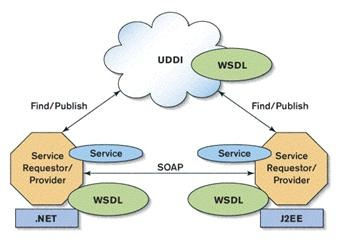
Barcode Web Service
Webservice is a software system designed to support interoperable machine-to-machine interaction over a network.
Barcode Web Service