support
UCC/EAN-128 Demo download

UCC/EAN-128

UCC/EAN-128 barcode label
UCC/EAN-128 Symbology Information

UCC/EAN-128 is known as GS1-128 now. It is a GS1 implementation of Code128 barcode.
The UCC/EAN-128 Symbology is a variant of the Code 128 Symbology.
The UCC EAN System was established by Uniform Code Council (UCC) in 1973.
In 1977, the European Article Numbering Association (EAN International) designed a compatible system for use in Europe.

The pattern of using FNC1 right after start character is reserved for UCC/EAN-128.
According to the specification, a UCC/EAN-128 symbol has the following characteristics:

  • Space is excluded from encodable charset.
  • The maximum data characters can be encoded is 48.
  • Including quiet zones, the maximum physical length is 165 mm (6.5 in.).
  • The minimum height of the symbol is 32 mm (1.25 in.).
  • The Human Readable Text of the data must be shown below the symbol. Start, stop, function character and check digit are not shown.
  • Application Identifiers (AIs) define the interpretation of data.
UCC/EAN-128 Symbology Structure
  • A Code-128 Start character (A, B, or C).
  • FNC1
  • Application Identifier (AI)
  • Data
  • Check Digit
  • Stop Character
UCC/EAN-128 Application Identifier (AI)

UCC/EAN-128 is extremely flexible, and is used for the representation of Element Strings using EAN.UCC System Application Identifiers. It is not intended to be read on items passing through the Point-of-Sale.

The system provides a series of Application Identifiers (AIs) that define the interpretation of data.
For a complete list of UCC/EAN-128 Application Identifiers, please click AIs.

USPS Confirmation Service AI=420 / 91

The AI 420 or 91 is used for USPS Confirmation Service. The data follows are Service Type Code (STC), Dun & Bradstreet Number (DUNS), Sequential Package ID.
A modulo 10 check digit is required to be appended at the rear end of the data.

Click Pub91 for detail information of USPS Confirmation Service.

SSCC-18 (Serial Shipping Container Code) AI=00

The Application Identifier (00) indicates that the data field contains an 18-digit SSCC.
It is used to identify individual shipping containers.
The data carrier for this Element String is the UCC/EAN-128 Bar Code Symbol.
Data consists of Packaging Type, Manufacturer Number and Serial Number.

SSCC-14 (Serial Shipping Container Code) AI=01

The Application Identifier (01) indicates that the data field contains an GTIN (Global Trade Item Number).
It is identical to SSCC-18 except that it is 4-digits shorter.
The data carrier for this Element String is EAN/UCC-8, UCC-12, or EAN/UCC-13 or an EAN/UCC-14 Identification Number Symbol.

HIBCC Code AI=22

The Application Identifier (22) indicates that the data field contains an Health Industry Business Communications Council (HIBCC) code.
It is used to encode optional quantity, data, lot/batch, and serial numbers.

Customer's Purchase Order Number AI=400

The Application Identifier (400) indicates that the data field contains the customer's purchase order number.
The field is alphanumeric and is restricted for use between two trading companies.
The data carrier for this Element String is the UCC/EAN-128 Bar Code Symbol.

International Bank Account Number (IBAN) AI=8007

The Application Identifier (8007) indicates that the data field contains the international bank account identifier.
Defined by ISO 13616, IBAN indicates to which account the amount of payment is to be transferred.
The data carrier for this Element String is the UCC/EAN-128 Bar Code Symbol.

UCC/EAN-128 Coupon Extended Code: AIs (8100 - 8102)

The Application Identifiers (8100) to (8102) indicates that the data fields contain data supplementary to a UCC coupon identification.
The data carrier for this Element String is the UCC/EAN-128 Bar Code Symbol.

AI Filler Digit UCC Prefix Offer Code Expire Date
8100 N1 N2-N6
8101 N1 N2-N6 N7-N10
8102 0 N2
Print UCC/EAN-128 Barcode In MS Word®
Attention: FNC1 is mapped to ASCII 247. Please use ÷ to represent FNC1.
Please use FNC1 (÷) prior to each AI.

After install Barcodesoft UCC/EAN-128 Demo on your computer, you will find an Encoder.
Click "Option" button to popup option dialog. Then choose "UCC/EAN-128" from Symbology Combobox.
Now, type in your data in the gray box as shown below.

Your data (02)12345678901234(10)12345678901234567890(15)090422 will be input as
÷(02)12345678901234÷(10)12345678901234567890÷(15)090422

Click "Copy to Clipboard" button then switch to MS Word and press Ctrl+V to paste.


UCC/EAN-128 barcode encode
Print UCC/EAN-128 Barcode In MS Excel®
Attention: FNC1 is mapped to ASCII 247. Please use ÷ to represent FNC1.
Please use FNC1 (÷) prior to each AI.

Your data (02)12345678901234(10)12345678901234567890(15)090422 will be input as
÷(02)12345678901234÷(10)12345678901234567890÷(15)090422

If you have a sequence of data to be turned into UCC/EAN-128 barcode, MS Excel® is a good tool.

1. If you are using Excel 2000 or 2003, please click menu ===> Tools ==> Macro ===> Security.
Choose Low security level.

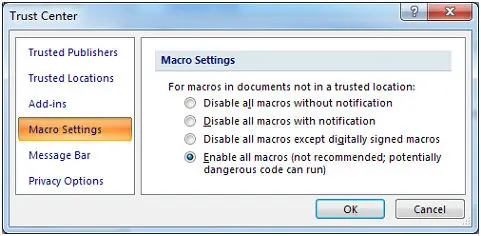
If you are using Excel 2007, click the Microsoft Office Button MS Office bar code
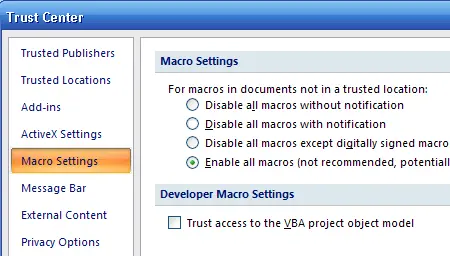
Then click Excel Options, choose Trust Center. In the Macro Settings category, under Macro Settings,
choose "Enable all macros".

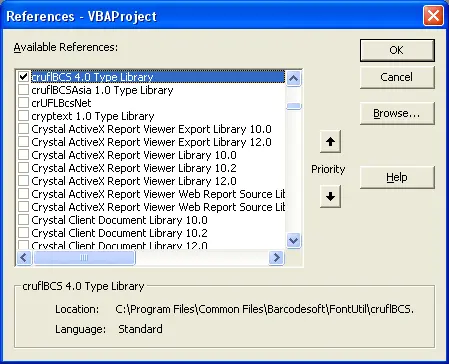
2. Press ALT + F11 to open Microsoft® Visual Basic editor.

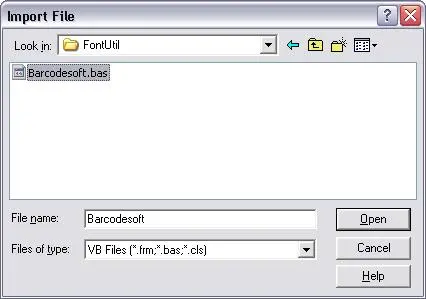
3. Press Ctrl+M, it will popup a dialog, choose barcodesoft.bas under
C:\Program File\CommonFiles\Barcodesoft\Fontutil folder. Then click "Open".

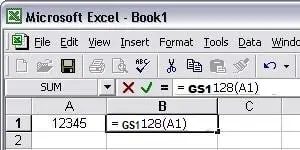
4. Close Visual Basic and go back to your spreadsheet. Now, you can use the following macros to encode data: UCCEAN128. When you have lots of data to process, you can just copy and paste the macro to the whole column.
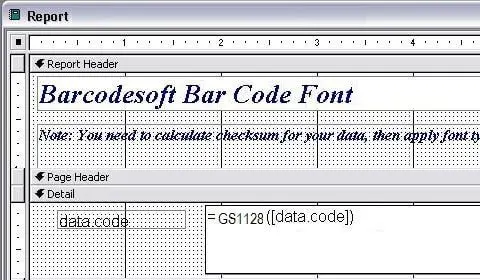
=UCCEAN128(xx)
Please use cell reference to replace xxx in the formulas.

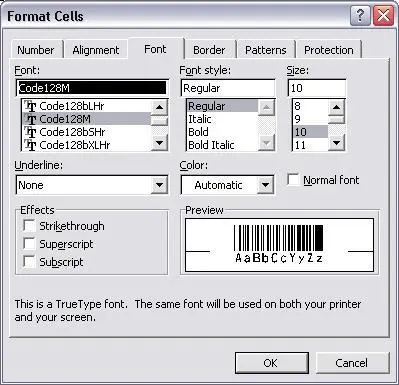
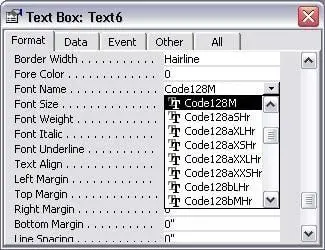
5. Right click Cell B1, choose Format Cell from context menu. Then click Font to apply one of the appropriate font typefaces to the cell.